Client Intake Form Synced to a De-Duplicated Airtable Feed

Turned every intake form response into an auto-linked, de-duplicated Airtable record.
Manually cross-referencing new form submissions against existing leads and booked meetings
~4 hrs/week
The Challenge
Every client intake form response needed to get logged and connected back to any existing lead or booked call on file. Doing that lookup and linking by hand for every submission meant a slow, error-prone manual step between the form and the sales team's actual pipeline view.
The Solution
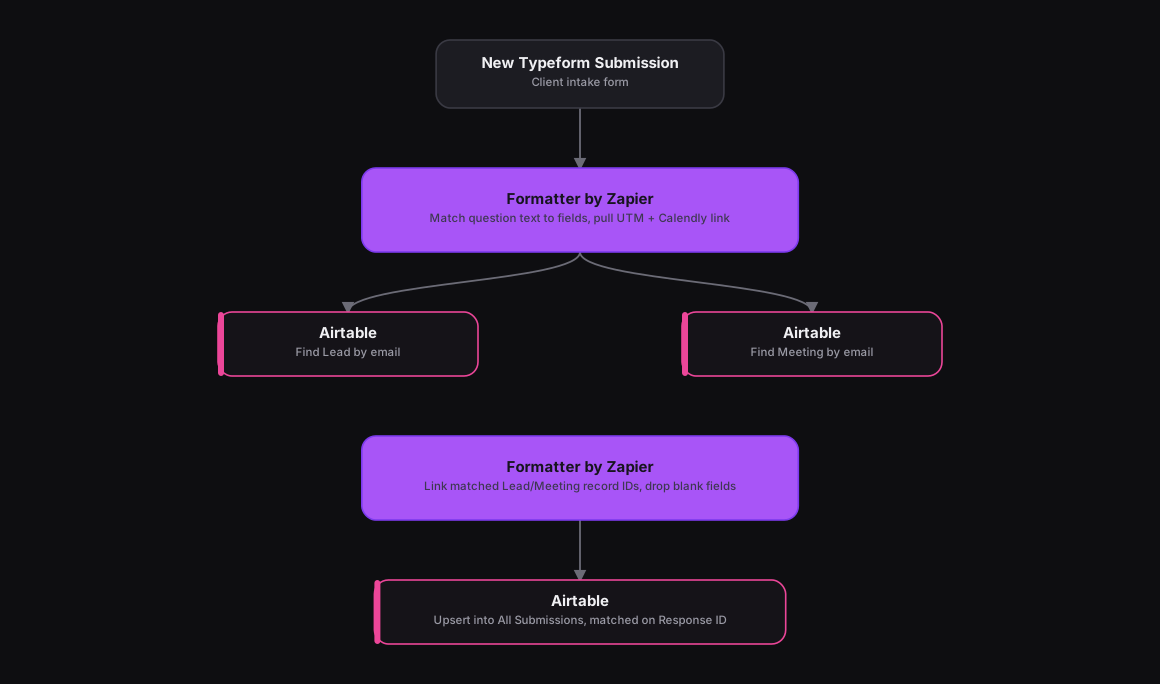
Adapted from an n8n workflow that ran two parallel Airtable searches before linking the result, the same shape works well in Zapier. A Typeform trigger fires on every new response, and a Formatter by Zapier step matches each question's text to the right field regardless of question order, then pulls UTM parameters and any Calendly link from the form's hidden fields. Two Airtable search actions run next, one finding a matching Lead by email, one finding a matching Meeting by email, and a second Formatter step links whichever record IDs turned up while dropping any blank fields so they don't overwrite existing data. A final Airtable action upserts the result into the All Submissions table, matched on the form's Response ID.
How It Works
The Results
Every intake submission lands in one Airtable feed automatically, already linked to any existing lead or booked meeting instead of sitting as an orphaned form response. The sales team gets a de-duplicated view of every prospect's full history without cross-referencing spreadsheets by hand.
Tools & Technologies Used
How To Create This
- Trigger the Zap on Typeform's New Entry trigger for the client intake form
- Add a Formatter by Zapier step that maps each question's text to a structured field and pulls UTM parameters and any Calendly link
- Add an Airtable 'Find Record' search on the Leads table matched by email
- Add a second Airtable 'Find Record' search on the Meetings table matched by email
- Use a Formatter by Zapier step to attach whichever record IDs were found and drop empty fields
- Upsert the result into Airtable's All Submissions table, matched on the Typeform Response ID
Related Case Studies
Auto-Logging Sales Meetings From Google Calendar Into Airtable
A Zapier setup that watches two reps' Google Calendars and drops every new sales meeting straight into a shared Airtable tracker.
One-Click Candidate Approval From Slack to ClickUp
A Zapier setup that lets a recruiter approve or reject a candidate right from Slack's buttons, and updates the ClickUp task the moment they click.
