Nudging Reps to Log the Outcome the Moment a Sales Call Ends

Nudged reps to log the call outcome the instant the meeting ended, in the right Slack thread.
Manually remembering to log a sales call's outcome right after it ends
~2 hrs/week
The Challenge
Sales calls routinely went un-logged in the CRM because nothing prompted a rep to actually write up the outcome once the call ended, and by the time someone noticed, the details were already fuzzy.
The Solution
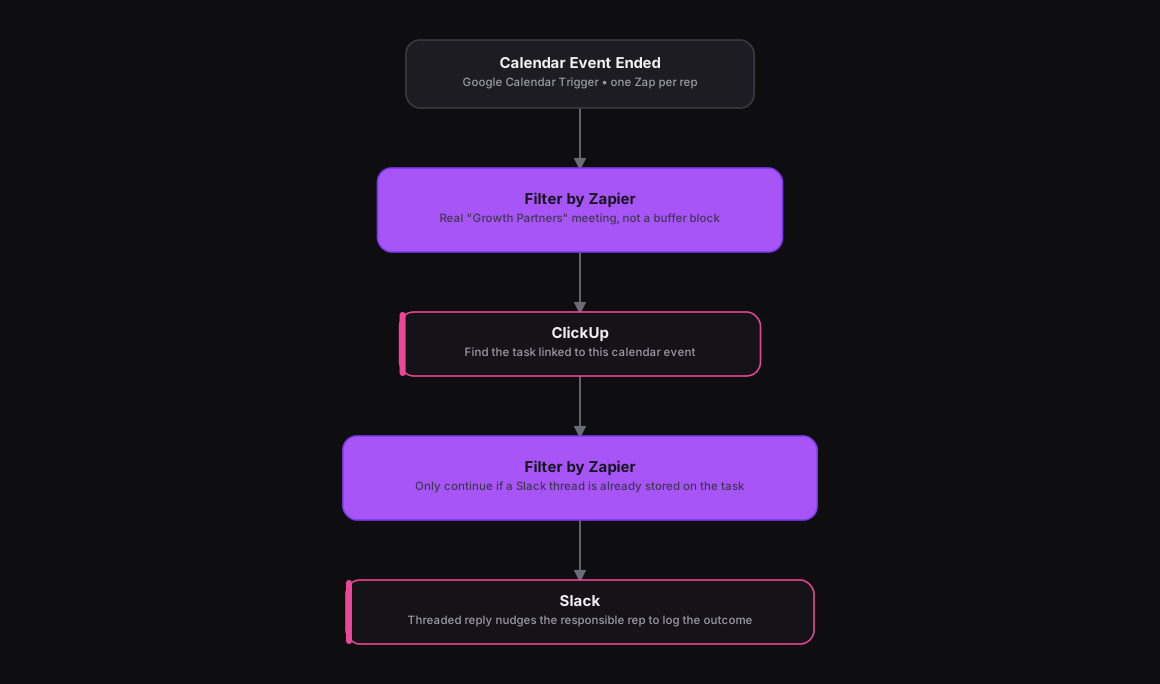
Adapted from an n8n workflow with dual calendar triggers and a chained pair of existence checks, the same logic runs as two Zaps, one per rep's calendar, triggered on Google Calendar's Event Ended event. A Filter by Zapier step keeps only real meetings, matching the sales keyword and excluding buffer blocks, and a ClickUp search action finds the task linked to that calendar event by its stored event ID. A second Filter by Zapier step only continues if that task already has a Slack thread timestamp saved on it, meaning the meeting was already announced, and a Slack action replies in that exact thread, tagging the responsible rep to update the outcome.
How It Works
The Results
Reps get a same-minute nudge in the exact Slack thread already tied to that meeting, instead of outcomes quietly going un-logged until someone notices a deal's gone cold.
Tools & Technologies Used
How To Create This
- Create one Zap per rep's calendar, triggered on Google Calendar's Event Ended event
- Add a Filter by Zapier step that keeps only meetings matching the sales keyword and excludes buffer blocks
- Add a ClickUp search action to find the task linked to the calendar event's stored ID
- Add a second Filter by Zapier step that only continues if the task already has a saved Slack thread timestamp
- Add a Slack action that replies in that thread, tagging the responsible rep to update the outcome
Related Case Studies
Auto-Logging Sales Meetings From Google Calendar Into Airtable
A Zapier setup that watches two reps' Google Calendars and drops every new sales meeting straight into a shared Airtable tracker.
One-Click Candidate Approval From Slack to ClickUp
A Zapier setup that lets a recruiter approve or reject a candidate right from Slack's buttons, and updates the ClickUp task the moment they click.
