Auto-Escalating Flagged Tasks to a Shared Command Center Dashboard

Made one checkbox trigger the dashboard add, the Slack alert, and the client tag together.
Manually adding a flagged task to the dashboard, posting in Slack, and tagging the right client
~2 hrs/week
The Challenge
Flagging a task for leadership visibility meant someone manually adding it to a shared Command Center list, posting a Slack heads-up, and making sure it was tagged with the right client. Three small manual steps that were easy to only half-finish when things got busy.
The Solution
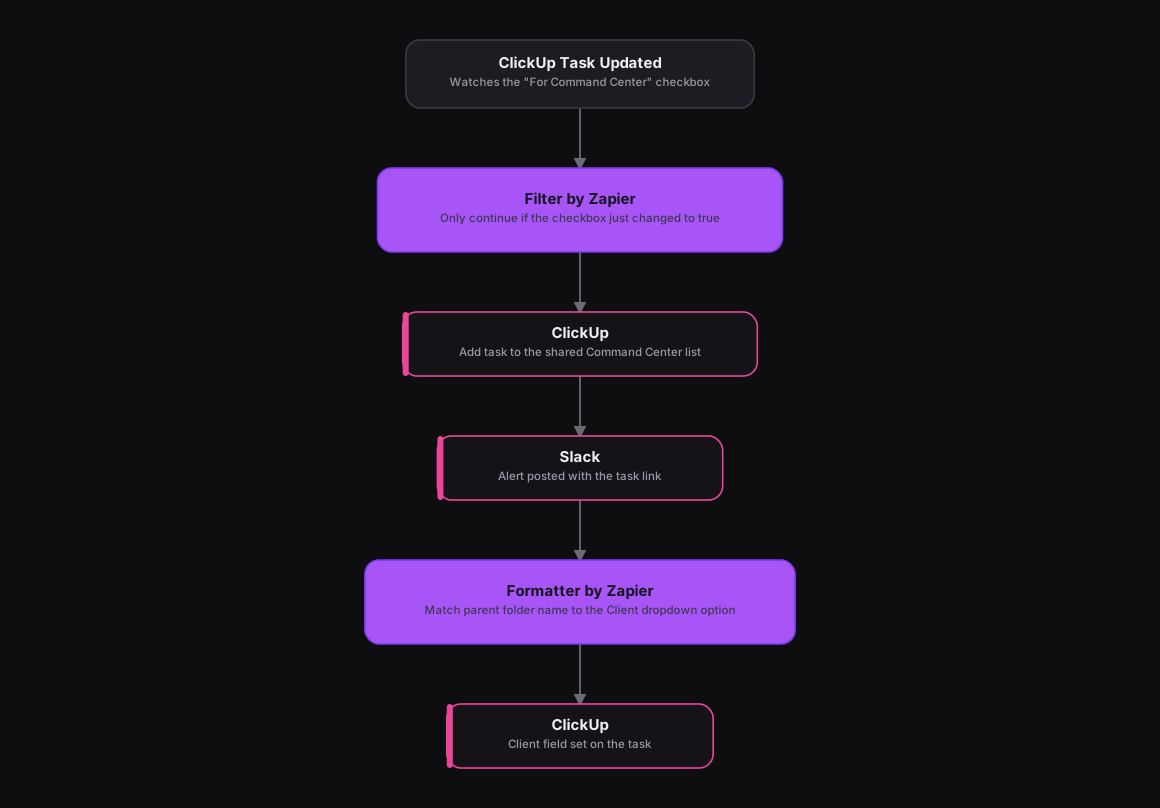
Adapted from an n8n workflow that gated on a single field-change condition, the same logic runs in Zapier as a ClickUp trigger on Task Updated, followed by a Filter by Zapier step that only continues if the "For Command Center" checkbox just changed to true. A ClickUp action adds the task to the shared Command Center list, and a Slack action posts an alert with a direct task link. A Formatter by Zapier step matches the task's parent folder name, stripping an internal CRM-ID suffix first, to the correct "Client" dropdown option, and a final ClickUp action sets that field on the task.
How It Works
The Results
Ticking one checkbox now does all three things at once. The task lands on the leadership dashboard, the team sees it in Slack, and it's correctly tagged with the client, instead of depending on someone remembering to do all three by hand.
Tools & Technologies Used
How To Create This
- Trigger the Zap on ClickUp's Task Updated event
- Add a Filter by Zapier step that only continues if the "For Command Center" checkbox just changed to true
- Add a ClickUp action to add the task to the shared Command Center list
- Add a Slack action to post an alert with a direct link to the task
- Use a Formatter by Zapier step to match the task's parent folder name to the correct Client dropdown option
- Add a final ClickUp action to set the Client field on the task
Related Case Studies
Auto-Logging Sales Meetings From Google Calendar Into Airtable
A Zapier setup that watches two reps' Google Calendars and drops every new sales meeting straight into a shared Airtable tracker.
One-Click Candidate Approval From Slack to ClickUp
A Zapier setup that lets a recruiter approve or reject a candidate right from Slack's buttons, and updates the ClickUp task the moment they click.
