Auto-Publishing Completed Case Studies From ClickUp Into Marketing's Airtable

Turned a finished ClickUp case study into a ready-to-use Airtable record automatically.
Manually copy-pasting client fields and outcome comments from ClickUp into Airtable
~2 hrs per case study
The Challenge
Ops finished documenting a client case study inside ClickUp, complete with client name, deployment type, ASIN, and a written outcome summary buried in the task's comments. Marketing needed that same information in their own Airtable to actually produce content from it, which meant someone copy-pasting fields and comment text between tools by hand.
The Solution
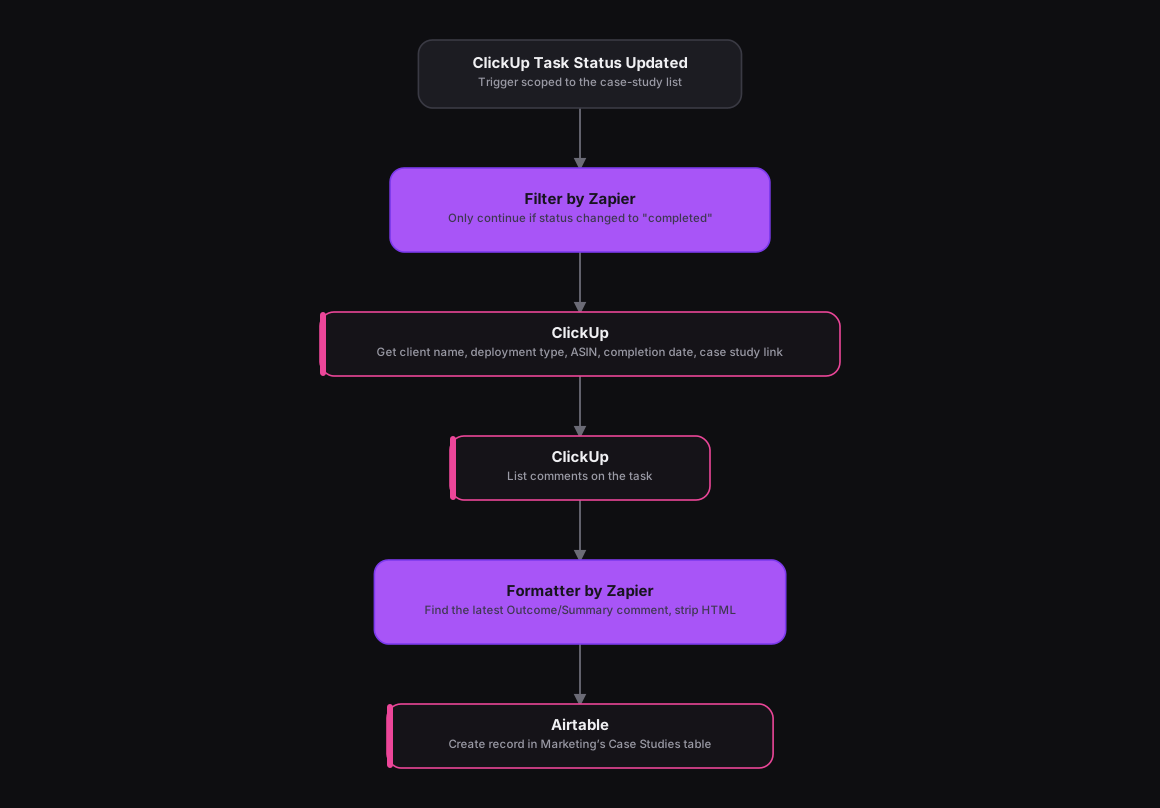
Adapted from an n8n workflow that gated on an existence check and a status switch before parsing ClickUp's comment thread, the same shape works cleanly in Zapier. A ClickUp trigger fires on Task Status Updated, and a Filter by Zapier step only continues if the new status is "completed." A ClickUp action pulls the task's custom fields (client name, deployment type, ASIN code, completion date, case study link), and a second ClickUp action lists every comment on the task. A Formatter by Zapier step finds the most recent comment containing "Outcome" or "Summary" and strips its HTML down to clean text, and an Airtable action creates a new record in Marketing's Case Studies table with everything filled in, including a link back to the original ClickUp task.
How It Works
The Results
Marketing gets a fully populated case-study record the instant ops marks the task complete, with the client details, ASIN, and written outcome already pulled from ClickUp's comment thread instead of someone re-typing it. No case study sits waiting for someone to notice it's done and log it by hand.
Tools & Technologies Used
How To Create This
- Trigger the Zap on ClickUp's Task Status Updated event, scoped to the case-study list
- Add a Filter by Zapier step that only continues if the new status is "completed"
- Add a ClickUp action to pull the task's client name, deployment type, ASIN, completion date, and case study link custom fields
- Add a second ClickUp action to list all comments on the task
- Use a Formatter by Zapier step to find the latest Outcome/Summary comment and strip it down to clean text
- Create a new record in Airtable's Marketing Case Studies table with all the extracted fields and a link back to ClickUp
Related Case Studies
Auto-Logging Sales Meetings From Google Calendar Into Airtable
A Zapier setup that watches two reps' Google Calendars and drops every new sales meeting straight into a shared Airtable tracker.
One-Click Candidate Approval From Slack to ClickUp
A Zapier setup that lets a recruiter approve or reject a candidate right from Slack's buttons, and updates the ClickUp task the moment they click.
