Self-Labeling Sales Meetings So Anyone Can See the Deal Stage at a Glance

Made every calendar event self-label its stage in the sales sequence automatically.
Manually renaming calendar events to reflect a prospect's stage in the meeting sequence
~1 hr/week
The Challenge
A glance at either rep's calendar couldn't tell anyone whether an upcoming call with a prospect was a first touch, a follow-up audit, or a deeper strategy session, since nothing on the event itself reflected where that relationship actually stood.
The Solution
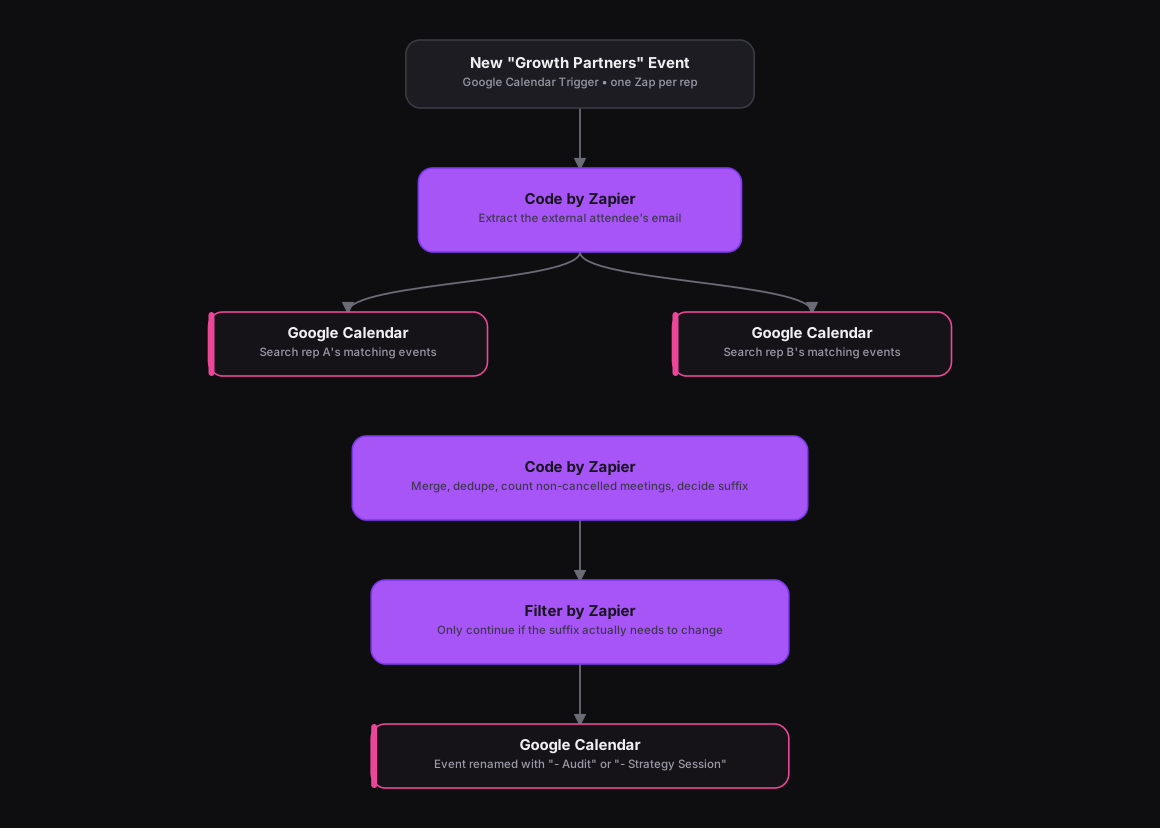
Adapted from an n8n workflow that merged two reps' calendars before counting meeting history, the same logic runs as two Zaps, one per rep's calendar, triggered on Google Calendar's New Event event and filtered to titles containing "Growth Partners." A Code by Zapier step extracts the external attendee's email, and two Google Calendar search actions pull each rep's matching events across a 13-month window. A second Code by Zapier step merges both result sets, drops cancelled events, dedupes, counts how many total meetings this prospect has had, and decides a suffix, "- Audit" on the second meeting, "- Strategy Session" from the third onward, after first stripping off any suffix already there. A Filter by Zapier step only continues if the suffix actually needs to change, and a Google Calendar action renames the event.
How It Works
The Results
Anyone glancing at either calendar can tell right away whether an upcoming call is a first touch, an audit, or a strategy session, without a rep renaming events by hand or remembering a prospect's full meeting history.
Tools & Technologies Used
How To Create This
- Create one Zap per rep's calendar, using Google Calendar's New Event trigger filtered to the sales meeting keyword
- Add a Code by Zapier step to extract the external attendee's email from the event
- Add Google Calendar search actions to pull each rep's matching events across a wide date window
- Use a Code by Zapier step to merge both calendars' results, dedupe, count non-cancelled meetings with that attendee, and decide the correct suffix
- Add a Filter by Zapier step that only continues if the suffix actually needs to change
- Use a Google Calendar action to rename the event with the decided suffix
Related Case Studies
Auto-Logging Sales Meetings From Google Calendar Into Airtable
A Zapier setup that watches two reps' Google Calendars and drops every new sales meeting straight into a shared Airtable tracker.
One-Click Candidate Approval From Slack to ClickUp
A Zapier setup that lets a recruiter approve or reject a candidate right from Slack's buttons, and updates the ClickUp task the moment they click.
