A Reusable Backfill Job for Keeping Airtable's Candidate Pool Complete

Built a one-click reconciliation job that catches anything the live sync missed.
Manually cross-checking Airtable against Workable and re-entering candidates that had slipped through the sync
~2 hrs per run
The Challenge
Whenever the live Workable-to-Airtable sync missed a candidate, someone had to cross-check both systems by hand and re-enter whatever slipped through. It was a tedious reconciliation job that nobody really owned.
The Solution
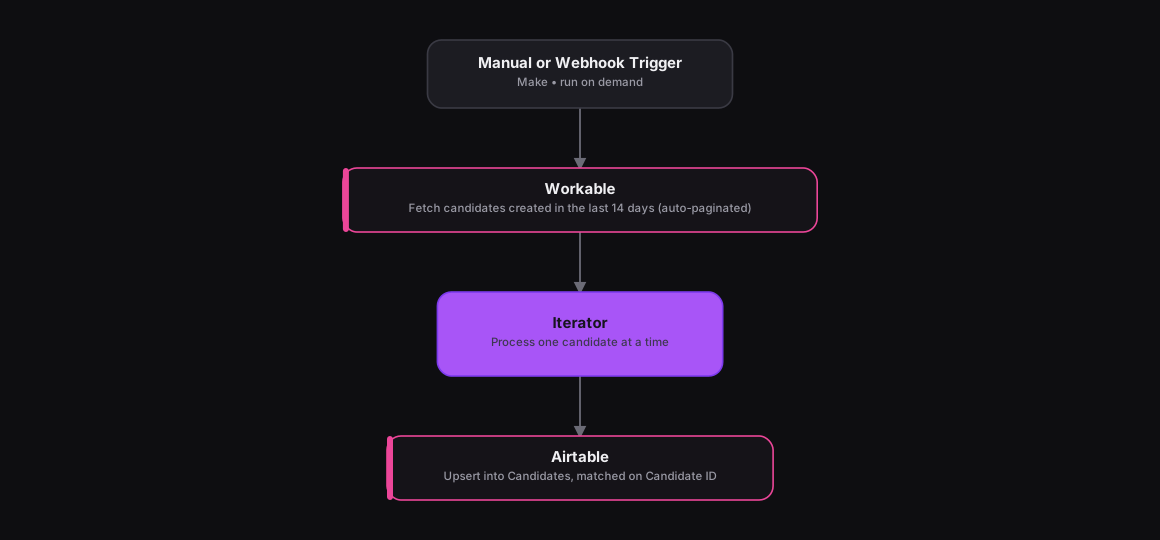
The n8n version was built around manual pagination. Make's native handling removes that complexity entirely. A Custom Webhook module lets the scenario run on demand or get called from another scenario, an HTTP module fetches every Workable candidate created in the last 14 days with Make's built-in pagination walking through the full result set automatically, and an Airtable module upserts each candidate into the Candidates table, matched on Candidate ID so a re-run never creates duplicates.
How It Works
The Results
Running this scenario reconciles Airtable against Workable in one pass, catching anything the live sync missed. Make's pagination handles however many pages come back, so there's no manually-coded loop tracking page tokens.
Tools & Technologies Used
How To Create This
- Trigger the scenario on a Custom Webhook module so it can run on demand or be called from another scenario
- Use an HTTP module to fetch every Workable candidate created in the last 14 days, relying on Make's built-in pagination
- Add an Iterator module to process one candidate at a time
- Upsert each candidate into Airtable's Candidates table, matched on Candidate ID to avoid duplicates on re-run
Related Case Studies
Turning a Sales Rep's Typeform Check-In Into a Slack Scorecard
A Make.com scenario that turns a sales rep's end-of-day Typeform check-in into a clean, formatted Slack scorecard. No manual compiling needed.
A Daily Recruitment KPI Scorecard Built From Google Sheets
A Make.com scenario that pulls each recruiter's weekly KPI progress from a Google Sheet and posts a formatted scorecard to Slack every weekday evening.
