Bootstrapping a New Client's GoHighLevel Account in One Call

Turned new-client GoHighLevel setup into a single webhook call that provisions the same fields every time.
Manually re-creating the same 5 custom fields by hand in the GoHighLevel UI for every new client
~1 hr per new client
The Challenge
Standing up a new client's GoHighLevel sub-account meant re-creating the same 5 custom fields by hand every time in the GHL UI, things like service type, goal, audit status, audit doc link, and ClickUp task ID. That left an easy opening for small inconsistencies to creep in between accounts.
The Solution
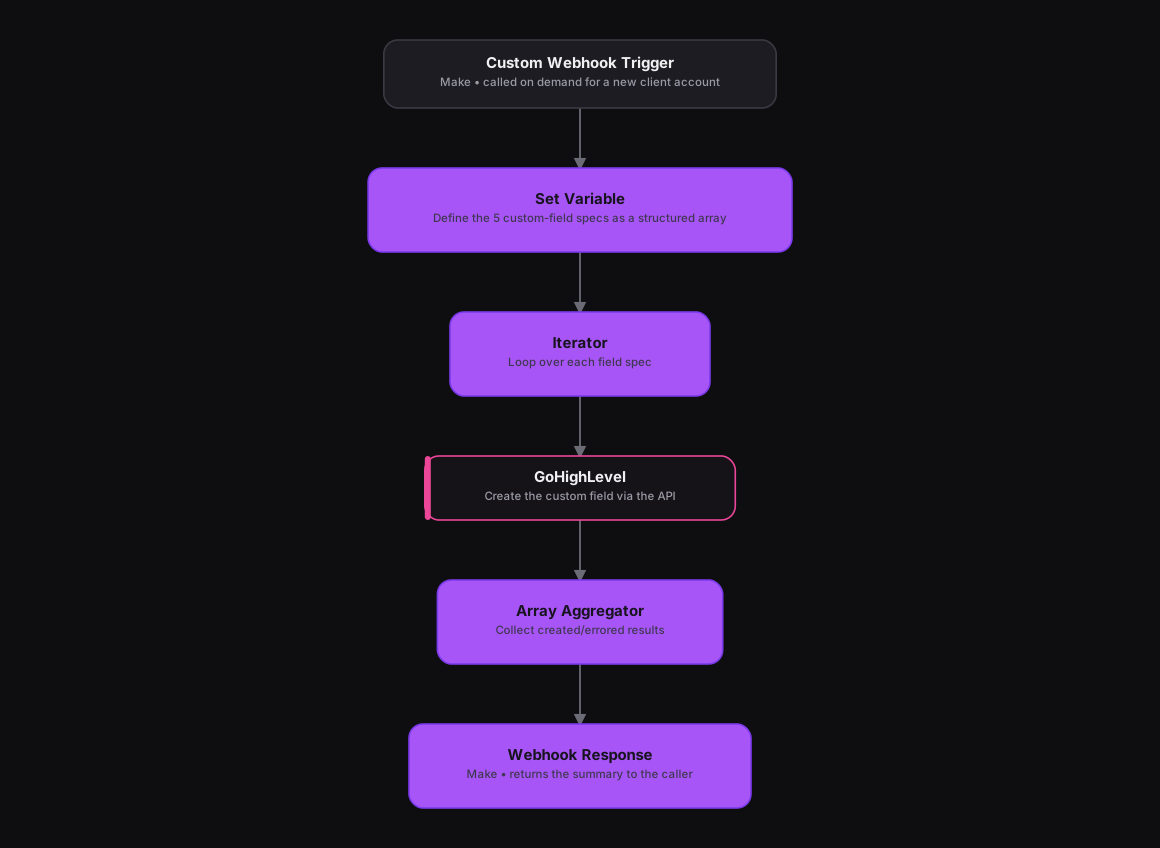
The n8n version was a provisioning utility, and that same one-time-setup logic runs in Make as a Custom Webhook module triggered on demand, a Set Variable module defining the 5 field specs as a structured array of name, type, and dropdown options, and an Iterator module looping over that array to call GoHighLevel's custom-fields API and create each one. An Array Aggregator collects the results, marking each field created or errored, and a Webhook Response module sends the summary back to whoever called it.
How It Works
The Results
A brand-new GoHighLevel account now gets the exact same 5-field schema every other client uses, in a single call, instead of someone re-creating dropdowns by hand and inevitably introducing small inconsistencies between accounts.
Tools & Technologies Used
How To Create This
- Trigger the scenario on a Custom Webhook module, called on demand when a new client account is created
- Use a Set Variable module to define the 5 custom-field specs as a structured array
- Add an Iterator module to loop over the array and call GoHighLevel's custom-fields API for each field
- Use an Array Aggregator to collect the created/errored results
- Return the summary to the caller with a Webhook Response module
Related Case Studies
Turning a Sales Rep's Typeform Check-In Into a Slack Scorecard
A Make.com scenario that turns a sales rep's end-of-day Typeform check-in into a clean, formatted Slack scorecard. No manual compiling needed.
A Daily Recruitment KPI Scorecard Built From Google Sheets
A Make.com scenario that pulls each recruiter's weekly KPI progress from a Google Sheet and posts a formatted scorecard to Slack every weekday evening.
