Keeping a GoHighLevel Pipeline in Sync With Every Calendly Booking

Made every Calendly booking or cancellation update the right GoHighLevel contact and pipeline stage automatically.
Manually checking for an existing contact, logging the meeting, and moving the deal to the right pipeline stage for every booking
~4 hrs/week
The Challenge
A booked or cancelled Calendly call needed to update the right GoHighLevel contact, meeting record, and pipeline stage. In practice that meant a rep checking by hand whether the contact existed, logging the meeting manually, and figuring out exactly which stage to move the deal to based on where it already sat.
The Solution
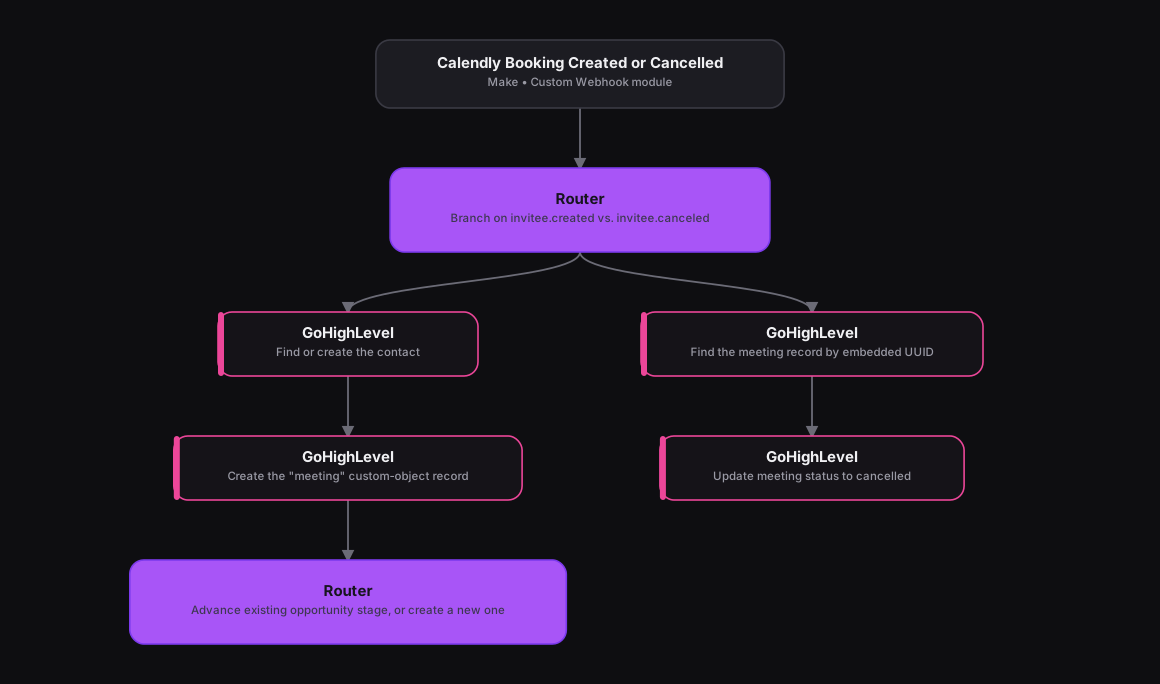
The original n8n workflow branched heavily, and Make's Router modules map onto that same decision tree cleanly. A Custom Webhook module catches Calendly's invitee.created and invitee.canceled events, and a Router splits on event type. On the created route, an HTTP module searches GoHighLevel contacts by email, a Router creates the contact if none turns up, an HTTP module logs a "meeting" custom-object record, and a second Router checks the contact's open opportunities against the Setter and Closer pipelines to decide whether to advance an existing opportunity or create a new one. On the cancelled route, an HTTP module finds the matching meeting record by a UUID embedded in the event title and marks it cancelled.
How It Works
The Results
Every booking or cancellation now updates GoHighLevel's contact, meeting log, and pipeline stage on its own, always moving the deal to the stage that matches where the prospect actually is, whether that's Setter-side discovery or Closer-side decision, without a rep touching the CRM.
Tools & Technologies Used
How To Create This
- Trigger the scenario on a Custom Webhook module catching Calendly's invitee.created and invitee.canceled events
- Add a Router splitting the scenario on event type
- On the created route, search for the GoHighLevel contact by email, create it if missing, and log a meeting custom-object record
- Add a Router that checks the contact's open opportunities against the Setter and Closer pipelines to decide the correct stage move
- On the cancelled route, find the meeting record by its embedded UUID and update its status to cancelled
Related Case Studies
Turning a Sales Rep's Typeform Check-In Into a Slack Scorecard
A Make.com scenario that turns a sales rep's end-of-day Typeform check-in into a clean, formatted Slack scorecard. No manual compiling needed.
A Daily Recruitment KPI Scorecard Built From Google Sheets
A Make.com scenario that pulls each recruiter's weekly KPI progress from a Google Sheet and posts a formatted scorecard to Slack every weekday evening.
